Building a Zero-Effort Obsidian to Portfolio Workflow

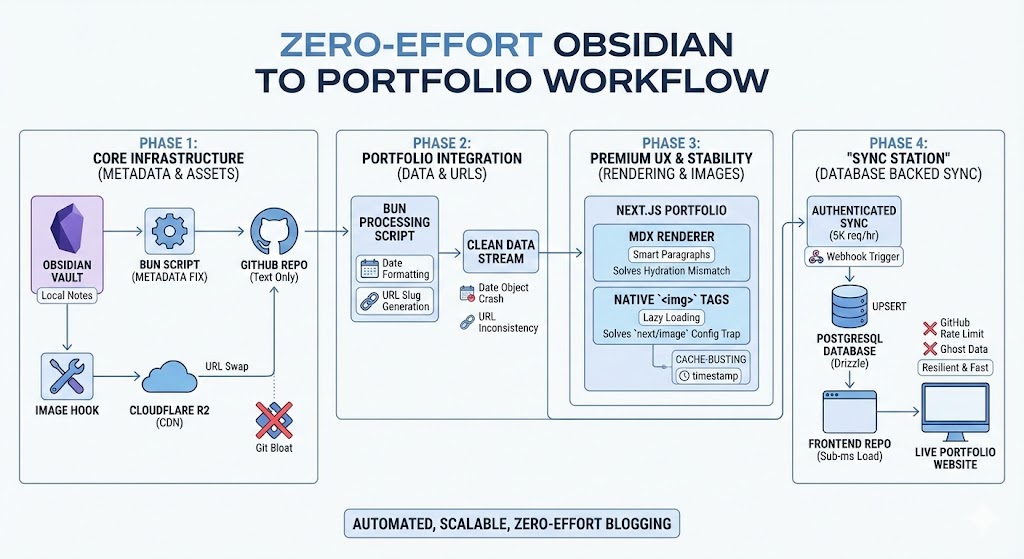
Building a Zero-Effort Obsidian to Portfolio Workflow
Turning local notes into a professional portfolio blog sounds simple in theory, but making it truly automated and production-ready at scale requires some serious architectural thought.
I didn't want a "copy-paste" workflow. I wanted a pipeline. One where I write, push, and the site just... acts. Here is the technical journey and the senior-level thinking approach I used to overcome the hurdles of building a mid-sized content engine.
🛠 Challenge 1: The Metadata Mess
Years of notes in my Obsidian vault had inconsistent frontmatter (or none at all). Some folders used tags, others used keywords. Building a reliable blog on top of this would lead to runtime crashes and broken UI.
The Thinking Approach:
A senior developer doesn't fix 80+ files manually. They build a tool. I needed a way to normalize the data before it reached the frontend.
How We Tackled It:
I built a Bun-powered pre-processor. Instead of trusting the raw notes, the script scans the vault, extracts titles from filenames when metadata is missing, and enforces a strict, predictable schema: title, date, updated, tags, and share. This turned a chaotic folder into a predictable Headless CMS.
☁ Challenge 2: The GitHub "Repo Bloat" Trap
Storing screenshots and assets directly in a Git repository is a classic mistake. It makes cloning slow, dev-loops heavy, and creates a "heavy" repository that becomes a pain to manage over time.
The Thinking Approach:
Git is for code and text, not for large binary objects. I needed a CDN-First strategy that kept my repo lean while keeping the workflow integrated into Obsidian.
How We Tackled It:
I integrated Cloudflare R2 into the workflow. Now, whenever I drag an image into a note, it’s instantly uploaded to R2. The local path is programmatically swapped for an optimized CDN URL. This keeps the GitHub repo restricted to 100% text, making synchronization lightning fast.
🔗 Challenge 3: The GitHub API Rate Limit Crisis
Initially, the site fetched notes live from the GitHub API for every visitor. This worked in development, but GitHub's "Guest" API limits you to only 60 requests per hour. One spike in traffic would crash the entire blog.
The Thinking Approach:
Never rely on a third-party API as your primary runtime data source. It's too slow and too risky. I needed a Middleman Architecture that provided 100% uptime regardless of GitHub's status.
How We Tackled It:
I transitioned to the "Sync Station" Model.
The portfolio now reads from a local PostgreSQL database (via Drizzle). We built a syncBlogPosts service that authenticates with a GITHUB_TOKEN (unlocking 5,000 req/hr) and UPSERTS data into our own DB. Visitors get sub-millisecond load times, and the site is immune to external rate limits.
🎭 Challenge 4: React Hydration & HTML Nesting
Markdown parsers often hide HTML complexity. My initial renderer were wrapping images in <div> tags, which the Markdown parser then tried to nest inside <p> tags. In HTML, that is illegal and causes "React Hydration Mismatch" errors.
The Thinking Approach:
Always validate your output. A site that "works" but has console errors isn't production-ready. I needed "Smart" rendering that understood the structure of the data it was handling.
How We Tackled It:
I implemented a Smart Paragraph Pattern. I built a custom MDX component that detects block-level children (like images) and dynamically switches the outer container from a <p> to a <div>. It’s a subtle fix that ensures the site is 100% stable and error-free.
🌟 Challenge 5: Editorial Control (Featured Posts)
As the archive grew, my best work was getting buried. Not every technical note I write is a "headline" piece, and I needed a way to guide visitors to my most valuable content.
The Thinking Approach:
A senior engineer thinks about Curation and Information Architecture. I needed a way to add an "Editorial Layer" to my automated pipeline without making the workflow complex.
How We Tackled It:
I extended the sync engine and the database schema to support a featured flag.
-
Detection: The sync script now looks for
featured: truein my Obsidian headers. -
Logic: The backend repository supports a dedicated SQL filter for these highlights.
-
UI: I added a premium "Featured" navigation tab and visual badges (gold stars and glowing borders) to make high-quality posts stand out immediately.
The Result: A "Pro" Workflow
The final pipeline is now invisible and bulletproof:
-
Write: I write naturally in Obsidian using my standardized templates.
-
Push: I push to GitHub. Only items marked
share: trueenter the pipeline. -
Automate: A Webhook (or CLI command) pings the "Sync Station," refreshing my PostgreSQL cache in seconds.
The Verdict: A blog shouldn't just be a collection of files—it should be a resilient content engine. By focusing on data normalization, caching, and curation, I’ve built a portfolio that is fast, scalable, and professional. 🚀 This portfolio runs exactly as described here — static files, no database, deployed via Dokploy. If you want the full technical breakdown of how the blog system works under the hood, check out my post on React Server Components vs Qwik.
Want to see a real production Dokploy deployment? See The Drive Center — a SaaS platform deployed the same way.
Further Reading
Related Articles
🎨 UI UX Pro Max Skill - Linux Setup Guide
Install UI/UX Pro Max skill on Linux for Antigravity IDE. Complete setup and configuration guide.
Docker Compose for Developers — From Zero to Production
Docker Compose for Developers — From Zero to Production Why I Wrote This I run a single VPS. One
Next.js App Router vs Pages Router — When to Use Each in 2026
Next.js App Router vs Pages Router — When to Use Each in 2026 The Question I Keep Getting Asked J